Orynt Money Wash
Wash dirty money into clean cash, your way.
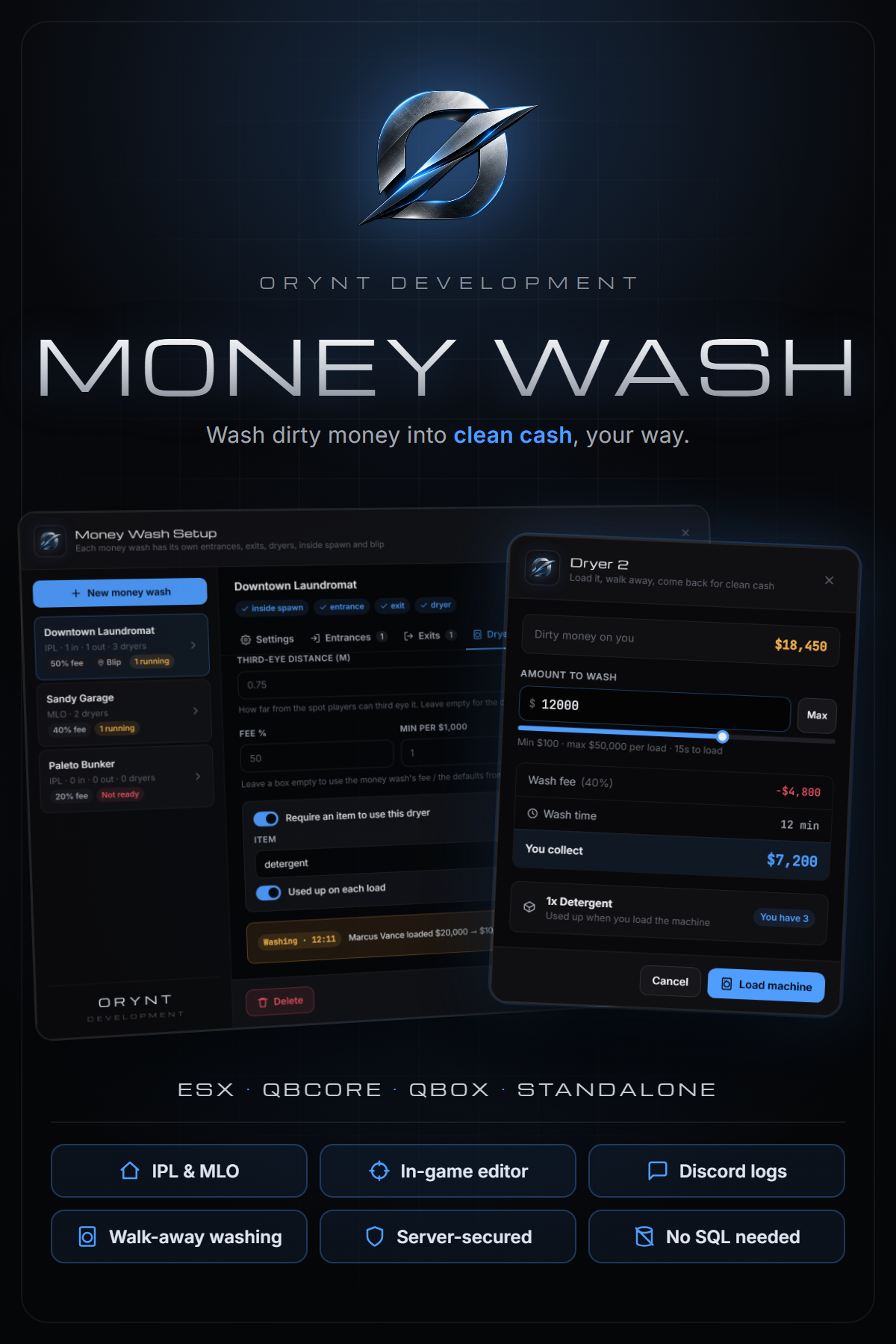
Players load dirty money into dryers, walk away while it washes, and come back to collect clean cash minus a fee. Build as many money washes as you want in-game with /washadmin. No coordinates to copy, no SQL to import.
Make the easy-to-find spots expensive and the hidden ones cheap: a laundromat on the main road at 50%, a back-alley garage at 40%, a hidden bunker at 20%.
━━━━━━━━━━━━━━━━━━━━
FEATURES
━━━━━━━━━━━━━━━━━━━━
• Works with ESX, QBCore, Qbox or no framework at all, detected automatically
• ox_inventory or your framework's inventory
• ox_target, qb-target, or a built-in "press E" prompt (no third eye needed)
• IPL or MLO: IPL washes teleport players in and out through entrances and exits. MLO washes are part of your map and players simply walk in
• In-game editor (/washadmin): create money washes, aim and click to place entrances, exits and dryers, set fees and blips, all without leaving the game
• Precise placement: a dot marks the exact spot, hold Ctrl and scroll to size the interaction zone
• Duplicate dryers down a row in seconds, with numbered labels that count up
• Fee per money wash, plus per-dryer overrides for fee, wash speed and max load
• Optional required item per dryer (e.g. detergent), used up or kept
• Walk-away washing: a short load animation, then the dryer runs on its own. The owner is notified when it's done, even if they left
• Dirty money as an item, a money account (ESX black_money) or QBCore/Qbox marked bills (change handed back as a new bag)
• Loads are saved on the server: they survive restarts and disconnects. No database needed
• Secure: every check runs on the server, the load animation can't be skipped, loads can't be collected twice
• Discord logs: loads, collections, admin changes and possible exploits, with a separate channel per log type
• Fully translatable: every player and staff text in one language file
• Customisable look: colors, fonts, notifications, blips, third-eye labels and icons
• Lightweight: nothing runs while nobody is near a money wash
━━━━━━━━━━━━━━━━━━━━
HOW IT PLAYS
━━━━━━━━━━━━━━━━━━━━
1. Walk into an MLO money wash, or enter an IPL one through its door
2. Third eye a dryer and choose how much to wash. The screen shows the fee, your payout and the wash time
3. Load the machine (15-second animation), then go do something else
4. Get a notification when it's clean and come back to collect
━━━━━━━━━━━━━━━━━━━━
REQUIREMENTS
━━━━━━━━━━━━━━━━━━━━
Required:
• ox_lib
Supported (optional, detected automatically):
• Framework: ESX, QBCore, Qbox (or none)
• Inventory: ox_inventory, or your framework's inventory
• Third eye: ox_target, qb-target (or the built-in E prompt)
• bob74_ipl, for the counterfeit cash factory interior
━━━━━━━━━━━━━━━━━━━━
WHAT'S INCLUDED
━━━━━━━━━━━━━━━━━━━━
• The orynt_moneywash resource
• Full documentation (README): installation, setup guide, every config option, Discord logs, translating and troubleshooting
• Open (unescrowed) files: config.lua, server config, language files, framework bridge and target bridge, so you can configure, translate and adapt it to custom frameworks
━━━━━━━━━━━━━━━━━━━━
INFO
━━━━━━━━━━━━━━━━━━━━
• Escrowed through Cfx.re asset escrow
• Lifetime updates
• Support: [Orynt Development]
By Orynt Development
Orynt Shops
Every shop, built in-game.
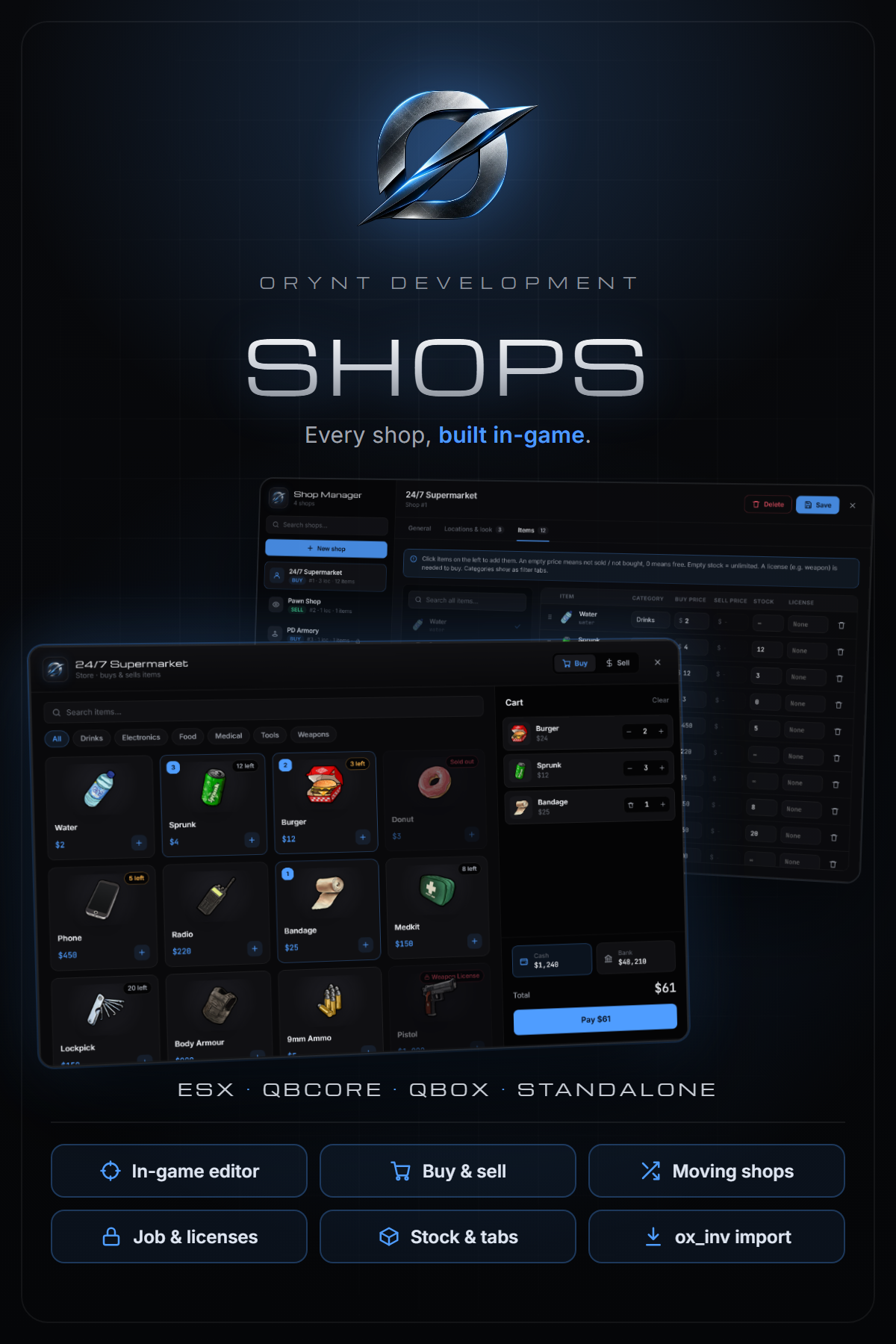
Create, place and stock every shop on your server without touching a config file. Open /shopadmin, aim where the shop goes, pick items from your inventory and set the prices. Set a shop up once and place it at as many locations as you like: every 24/7 on the map can share one setup, one price list and one stock.
━━━━━━━━━━━━━━━━━━━━
FEATURES
━━━━━━━━━━━━━━━━━━━━
• In-game Shop Manager (/shopadmin): create shops, aim to place them, pick items with pictures, set prices, teleport between locations. Admins can also third-eye any shop to edit it
• Store, buyer or both: players buy from it, sell to it (pawn shops), or both
• Up to 50 locations per shop sharing items, prices, stock and settings
• Three ways to open: NPC shopkeeper with third eye, a third-eye spot, or a marker with [E]
• Per item: buy price, sell price, limited stock, category tabs and a required license (e.g. weapon)
• Payment in cash, bank, or an item as currency (e.g. dirty money). Choose where money from selling goes
• Job locks with a minimum grade: only that job sees the blip and can open the shop
• Moving shops: black markets that open at only some of their locations and move every restart or on a timer. Players are only ever sent the open locations
• Clean shop window: search, category filters, cart, stock and license badges, cash and bank balances
• Secure: every purchase and sale is checked on the server (distance, job, license, stock, price, money, carry weight), with automatic refunds if items don't fit
• Import your existing ox_inventory shops with one command (/shopimport)
• No SQL: shops are saved on the server automatically
• Discord logs for purchases, sales and admin changes, with a channel per log type
• Fully translatable and customisable colors, fonts and icons
• Lightweight: peds only spawn near players, nothing runs while nobody is near a shop
━━━━━━━━━━━━━━━━━━━━
REQUIREMENTS
━━━━━━━━━━━━━━━━━━━━
Required:
• ox_lib
Supported (optional, detected automatically):
• Framework: ESX, QBCore, Qbox (or none)
• Inventory: ox_inventory, qb-inventory or ESX's inventory
• Third eye: ox_target, qb-target (or the built-in E prompt)
━━━━━━━━━━━━━━━━━━━━
WHAT'S INCLUDED
━━━━━━━━━━━━━━━━━━━━
• The orynt_shops resource
• Full documentation (README): installation, importing, every Shop Manager option, every config option, Discord logs, translating and troubleshooting
• Open (unescrowed) files: config.lua, server config, language files, framework bridge and target bridge, so you can configure, translate and adapt it to custom frameworks
━━━━━━━━━━━━━━━━━━━━
INFO
━━━━━━━━━━━━━━━━━━━━
• Escrowed through Cfx.re asset escrow
• Support: [Orynt Development]
By Orynt Development
Orynt Prop Manager
Remove, move and place props, all from one menu.
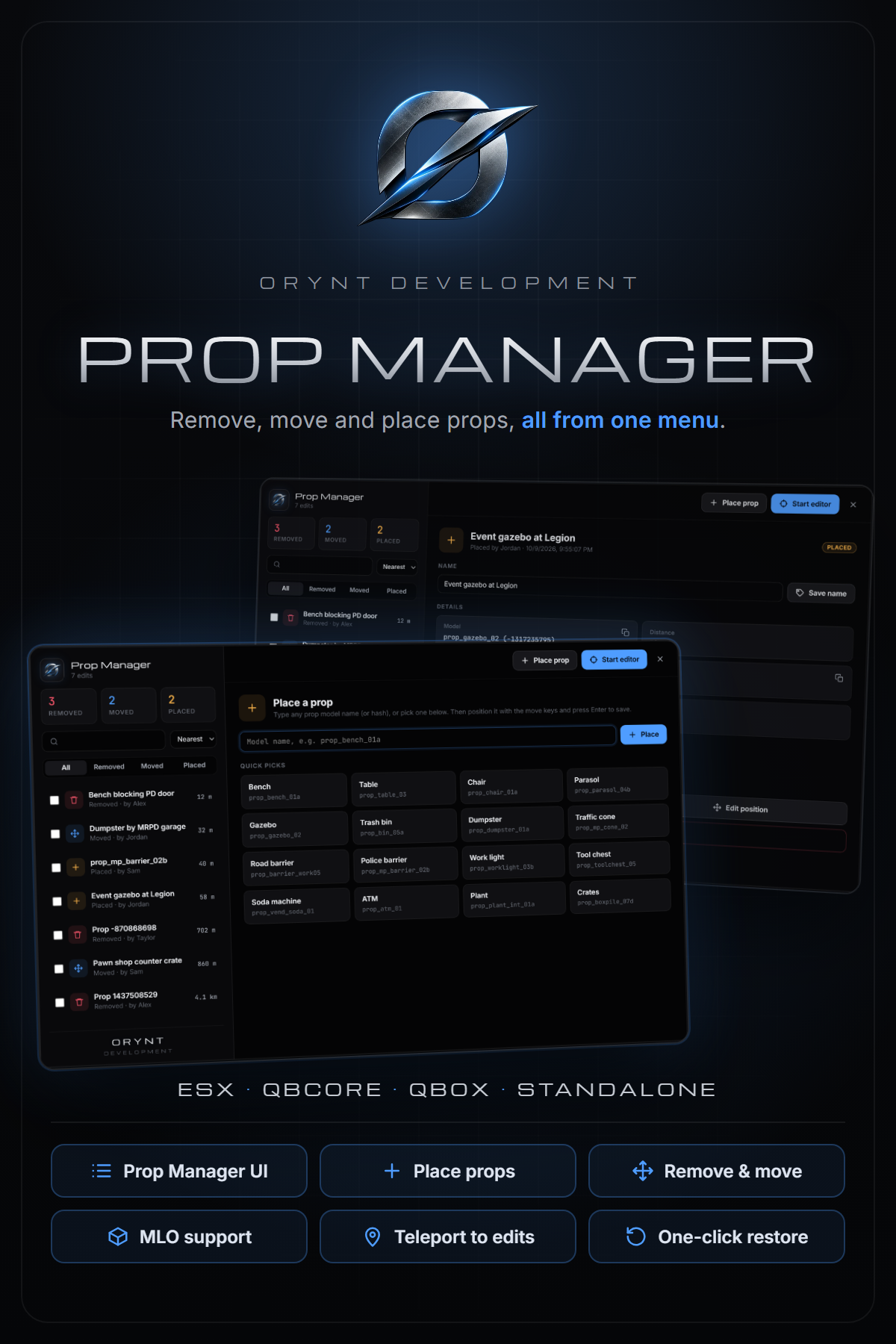
Clean up your map without touching a single file. Type /propmanager and every prop edit on your server is in one window: remove a bench blocking a doorway, move a dumpster away from an MLO entrance, or place new props for an event. Every edit is saved on the server automatically and shows for every player, including props inside MLOs.
━━━━━━━━━━━━━━━━━━━━
FEATURES
━━━━━━━━━━━━━━━━━━━━
• One command, one menu (/propmanager): every edit in one list with search, filters (removed / moved / placed) and sorting by distance or date
• Remove or move any map prop: aim at it, press E and pick an option
• Place new props: pick from quick picks or type any prop model name, then position it and save
• Move mode with live position and rotation, all 3 axes, snap to ground, fast / slow, and Tab to type exact values
• Teleport to any edit (original spot or new position) straight from the menu
• Name your edits ("Bench blocking the PD door") so staff know why a prop was changed
• Restore one edit, or select several and undo them all at once
• Edit position of moved and placed props from the menu: it takes you there and opens move mode
• Markers at removed props' original spots, so they can be restored in-world too
• Works on MLO props: interiors keep re-creating their props, so edits are re-applied automatically
• Safe: props spawned by other scripts are locked, so you can't break another resource's objects
• Copy model names, coordinates and ids with one click
• No SQL: edits are saved on the server automatically and survive restarts
• Discord logs for removes, moves, placed props and restores, with a channel per log type
• Fully translatable, with customisable UI colors, fonts and keys
• Lightweight: about 0.00 ms idle. Edits only stream in near players, and placed props are local objects that cost no network entities
━━━━━━━━━━━━━━━━━━━━
REQUIREMENTS
━━━━━━━━━━━━━━━━━━━━
Required:
• ox_lib
Supported (optional, detected automatically):
• Framework: ESX, QBCore, Qbox (or none). Only used so their admin groups get access; ace permissions work everywhere
━━━━━━━━━━━━━━━━━━━━
WHAT'S INCLUDED
━━━━━━━━━━━━━━━━━━━━
• The orynt_propmanager resource
• Full documentation (README): installation, the Prop Manager, placing props, the aim editor, move mode, every config option, Discord logs, translating and troubleshooting
• Open (unescrowed) files: config.lua, server config and language files, so you can configure and translate it
━━━━━━━━━━━━━━━━━━━━
INFO
━━━━━━━━━━━━━━━━━━━━
• Escrowed through Cfx.re asset escrow
• Support: [Orynt Development]
By Orynt Development
Orynt Queue
Priority your way: ace permissions, Discord roles, or both.
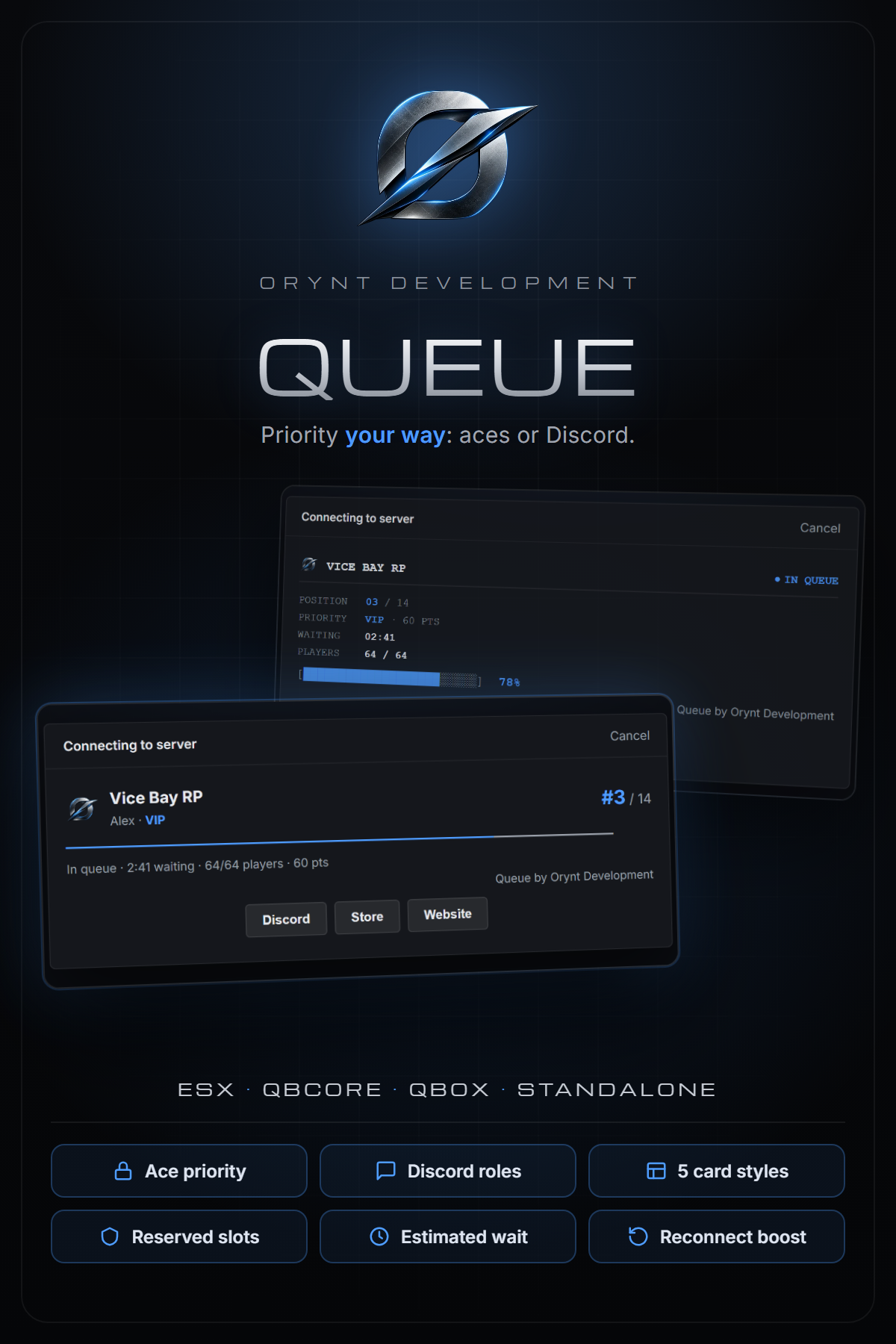
A connection queue for full servers with a clean queue card. Players see their position, a progress line, their priority, wait time and an estimated wait. Priority comes from ace permissions out of the box, no Discord bot needed. Add a bot token, or use your existing Badger_Discord_API, for Discord role priority.
━━━━━━━━━━━━━━━━━━━━
FEATURES
━━━━━━━━━━━━━━━━━━━━
• 5 queue card styles: Slim, Terminal, Focus, Stats and Inline. One setting to switch
• Priority tiers from ace permissions and/or Discord roles: each tier can use either or both
• Works three ways: aces only, your own Discord bot, or Badger_Discord_API (picked up automatically)
• Reserved slots: keep the last few slots for staff or high priority so they can always get in
• Estimated wait on the card, worked out from how fast players got in recently
• Reconnect priority: players who crash get extra points if they come back within 5 minutes
• Fair: equal priority is first come, first served; slots are held for players still loading in
• Optional: require Discord linked to FiveM, and/or membership of your Discord server (never locks everyone out during a Discord outage)
• Your logo, banner and buttons (Discord, store, website) on the card
• Discord logs for joins, leaves and connects
• Admin command (/queue) and exports
• Fully translatable
━━━━━━━━━━━━━━━━━━━━
REQUIREMENTS
━━━━━━━━━━━━━━━━━━━━
• None
Optional:
• A Discord bot token or Badger_Discord_API, for Discord role priority
━━━━━━━━━━━━━━━━━━━━
WHAT'S INCLUDED
━━━━━━━━━━━━━━━━━━━━
• The orynt_queue resource
• Full documentation (README): installation, ace and Discord priority setup, every config option, card styles, logs and troubleshooting
• Open (unescrowed) files: config.lua, logs config, language files and the Discord module, so you can configure, translate and adapt it
━━━━━━━━━━━━━━━━━━━━
INFO
━━━━━━━━━━━━━━━━━━━━
• Escrowed through Cfx.re asset escrow
• Support: [Orynt Development]
By Orynt Development